






4 upgrades for Eagleview Assess
By Eagleview.
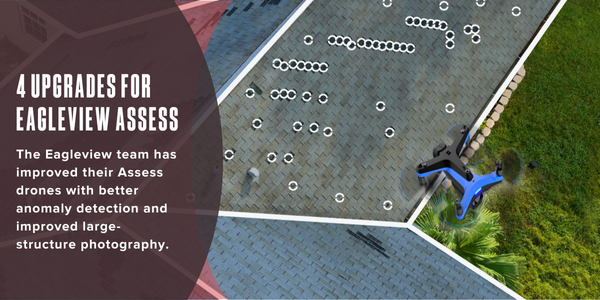
The Eagleview team has improved their Assess drones with better anomaly detection and improved large-structure photography.
Eagleview Assess™ is a drone-based program that captures high-resolution imagery of a roof. Those images can then be used in insurance claims and for project estimating. This is both a more efficient method (Eagleview’s drones are easy-to-fly and autonomous), but it is also safer, as it keeps contractors and insurance adjusters safe on the ground.
Recently, our team made some enhancements and improvements to their drones, based on the feedback we received from professionals in the field. These include everything from better anomaly detection to better inspection photos of multifaceted structures. Keep reading to learn more about these new features!
 1 - More consistent hail anomaly detection
With our improved anomaly detection, more legitimate hail hits are identified, and hail hits can be distinguished from other surface anomalies such as blistering, granule loss or general wear.
This feature directly addresses issues that claims adjusters in particular have encountered. They now can fully trust the anomaly detection, and the reliability of the detection report helps adjusters create accurate repair estimates and make the best claims decisions.
 2 - Large structure inspections
Our drones can take inspection photos of apartment complexes, churches, and other large structures that have multiple facets.
This is important as large and complex roofs can be dangerous to inspect. For large buildings, our drones capture photos of the entire roof so adjusters can see the anomalies without having to climb onto the roof. Adjusters who fly our drones can now use them on a wider variety of property types.
 3 - High-resolution facet imagery added to anomaly reports
We replaced the low-resolution mosaic imagery in our anomaly reports with high-resolution pictures of facets. Adjusters gain a clearer view of the facets and anomalies.
The clarity of this new imagery helps adjusters and other professionals analyze the anomalies and have confidence in their claims analysis. With our upgraded imagery there are no pixelated or distorted images in the anomaly reports.
 4 - Improved test square movement and anomaly counting
We improved the user controls for test square movement and analysis. When looking at roof anomalies in the user interface, an adjuster can move a test square to a new spot and set it there. The number of anomalies within that test square will be automatically calculated.
Test squares can also be resized to fit specific areas on a roof. Adjusters can choose from preset sizes such as the standard 10-foot x 10-foot square or pick a 5-foot x 20-foot shape for longer roof slopes.
Claims adjusters in particular benefit from this as it is now easier to count the anomalies within any given test square. Test squares can be ‘set’ in a specific location that an adjuster wants to analyze.
Original article and photo source: Eagleview
Learn more about EagleView One in their Coffee Shop directory or visit www.eagleview.com.
Recommended For You
Smarter HVAC engineering for healthier buildings
Read More ...
Order building materials the smart way
Read More ...
A multi-application building system
Read More ...
UP TO THE MINUTE






Comments
Leave a Reply
Have an account? Login to leave a comment!
Sign In